Purpose
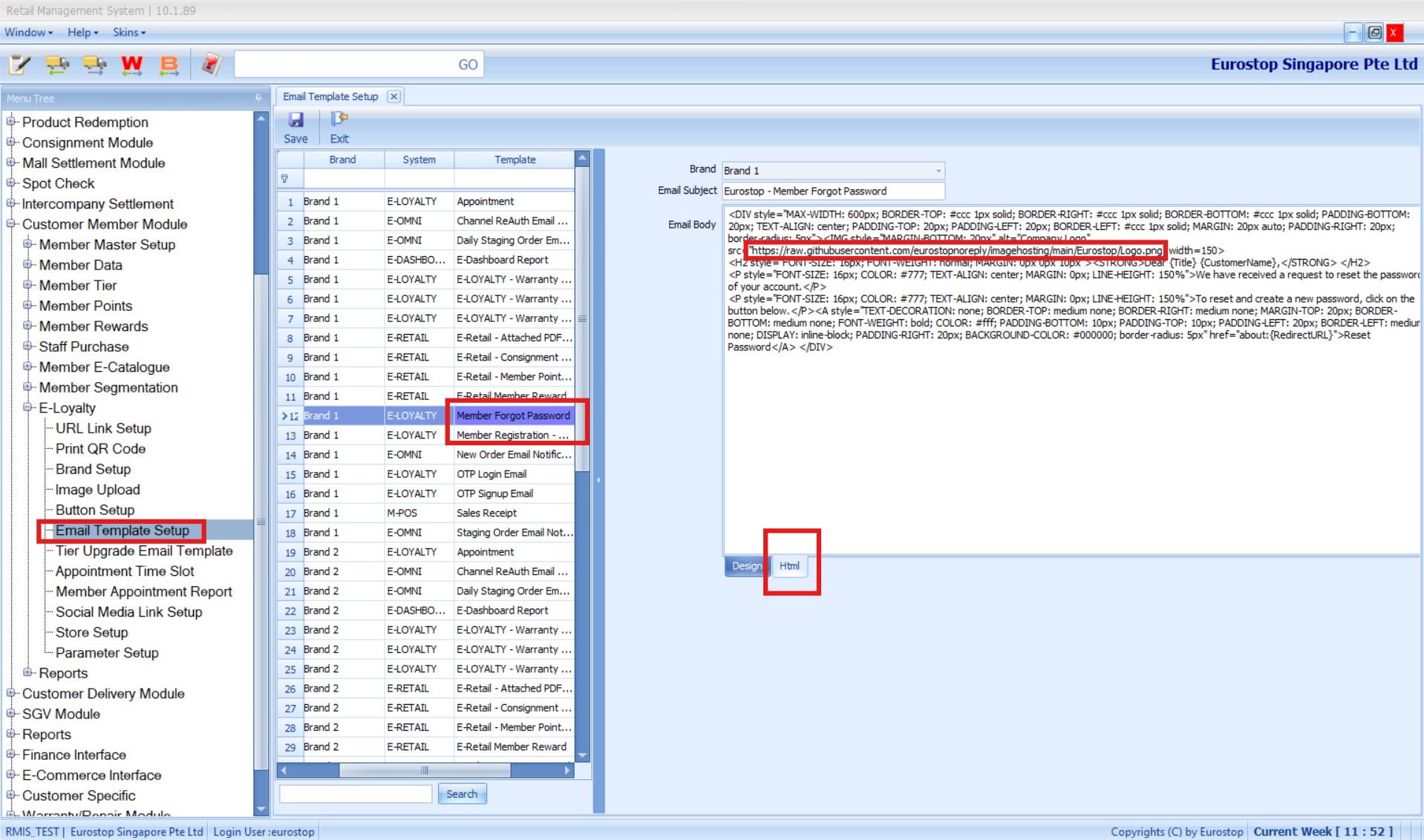
Configure email templates for customer loyalty communications (Eloyalty) such as Welcome, Forgot Password notifications.
Prerequisites
Access to Customer Member Module > Eloyalty > Email Template Setup.
Store logo images as accessible URLs (e.g., hosted in GitHub).
Steps
Navigate to Customer Member Module > Eloyalty > Email Template Setup.
Click the respective email template.
Click HTML to edit the template content.
Make necessary changes (e.g., update text, insert logo via URL).
Click Save to apply changes.
Notes / Tips
Ensure SMTP is properly configured for emails to be delivered successfully.
Use fully qualified image URLs to display logos correctly in emails.
Was this article helpful?
That’s Great!
Thank you for your feedback
Sorry! We couldn't be helpful
Thank you for your feedback
Feedback sent
We appreciate your effort and will try to fix the article